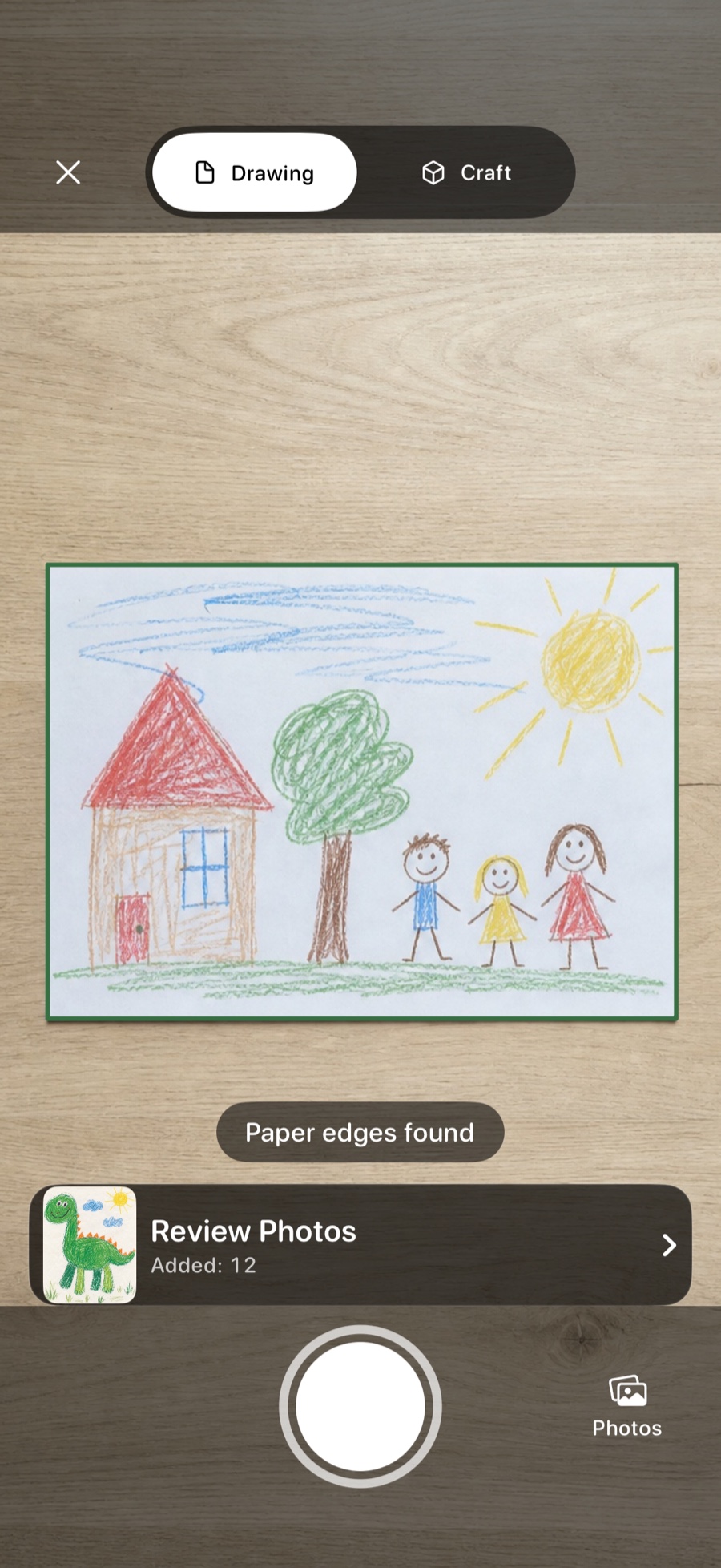
Paper-aware capture, not a blind shutter
Mademory looks for the page and shows what it found. Automatic edges are a helpful starting point, never a lock: you can correct the crop before or after saving the work.
 Mademory
Keep taking photos without stopping to label each one. Review the batch at full, proportional size, fix rotation or crop, and save only when it looks right.
Drawing and craft capture modes
Batch review before anything enters the gallery
Reversible rotation and quadrilateral crop editing
Mademory looks for the page and shows what it found. Automatic edges are a helpful starting point, never a lock: you can correct the crop before or after saving the work.
Portrait, landscape and unusually shaped work keep their natural proportions. Every item has its own readiness state, rotation, crop and remove controls, so one uncertain photo never hides inside a batch.
The cleaned presentation does not replace the source photo. Mademory retains the original and edit instructions so later corrections stay reversible rather than baking every decision into one file.
Your family archive stays yours.
No ads. No behavioral analytics. No developer account required.
Move the four corners manually in Review. You can also reopen a saved work and change its crop later.
Yes. Choose several images from the Photos picker and review them through the same archive-safe flow.
MademoryTurn drawings, paintings and schoolwork into a beautiful archive you can actually revisit - with the child, date and story still attached.